Module 6 of 17

Safe practical teaching

6.1Use Presentation → Practice → Production

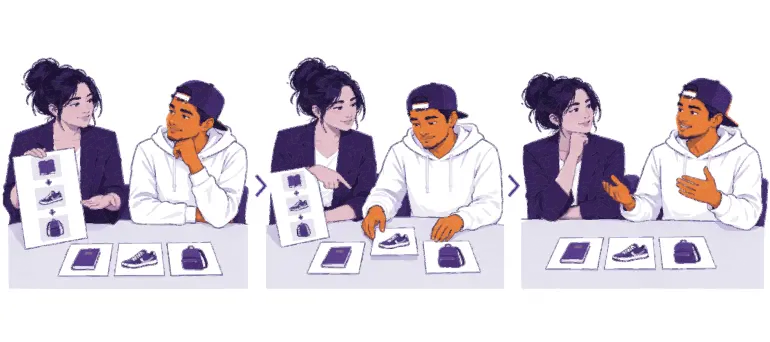
Presentation: Demonstrate the complete process. Explain the purpose, terms, choices, expected result, failure points, privacy consequences, and stop conditions. Learners observe before handling a device.

Practice: Learners follow a supported process using prepared materials, a simulation, test environment, empty training wallet, or an educator-approved low-stakes live setting. Pause for checks and give feedback.

Production: Learners complete a defined practical task or direct the decisions without step-by-step prompting. This stage can provide formal practical evidence when the task and rubric are approved and an educator observes it.

Presentation

Practice

Production
End with reflection:

  • What did you verify?
  • What could have failed?
  • Which information remained private?
  • When would you stop or seek help?
  • What is a safe next step?

6.2Demonstration safety protocol

Before a live tool demonstration:

  1. Confirm the exact tool, version, source, network, custody model, and recovery method.
  2. Run the full process privately on the same device and connection.
  3. Decide whether funds are required. Prefer no funds; otherwise use an amount whose complete loss would remain a lesson, not a crisis.
  4. Prepare the expected state and a recovery or reset process.
  5. Define stop conditions.
  6. Tell learners what information is public, private, or fictional.
  7. Position screens so no unrelated notifications, contacts, balances, or accounts are displayed.
  8. Prepare an offline or printed equivalent.
  9. Stop if the interface, address, invoice, amount, network, or result differs materially from the checked process.
  10. Clear temporary learner data after the session.

6.3Universal stop conditions

Stop immediately when a safety check fails

Stopping is a successful safety behavior. Protect people and secrets, verify the issue, and use a prepared safe route or postpone the activity. Do not shame the learner who notices a problem.

Stop the activity immediately if:

  • a real seed phrase, private key, password, or credential appears
  • someone asks a learner to reveal or enter recovery information
  • an address, invoice, recipient, network, amount, or unit does not match
  • a wallet or website is not the verified source
  • a request creates urgency, secrecy, pressure, or a promised return
  • the tool changes behavior or requires an unfamiliar recovery step
  • a learner is unsure whether real funds are involved
  • a transaction would expose unnecessary financial or identity data
  • internet, power, or device failure removes a required safety check; or
  • the educator cannot explain what will happen next.
  1. 1Spot the conditionSomething is unsafe or cannot be explained.
  2. 2Stop the activityPause everything at once.
  3. 3Protect peopleKeep people and secrets safe.
  4. 4Verify the issueCheck what went wrong, calmly.
  5. 5Log it as Not yetA safety-critical assessment error is recorded as Not yet.
  6. 6Reset and reassessReset the setting, practise, and reassess later.

6.4No real secrets in class

No real secrets in class

Use prepared recovery words, clearly marked training material, or an empty disposable wallet for recovery practice. Never use a learner's personal or funded wallet, or create a process in which anyone can observe lasting recovery information.

Do not ask learners to prove self-custody by showing a seed phrase. Proof of competence is safe handling and explanation, not disclosure.

6.5Shared devices

When devices are shared:

  • assign turns and roles clearly
  • make the learner being assessed control or direct every relevant decision
  • reset the device between learners
  • remove accounts, contacts, screenshots, clipboard data, and histories
  • do not let one learner's familiarity become another learner's evidence; and
  • use individual follow-up observation where group work hides performance.

↑ Back to table of contents